Styled Output With Spectre.Console
Currently todo prints all output as plain text. In this step, you'll render the task list as a Spectre.Console table and use Spectre styling for help and command-line errors.
Add the package
Add the AnyCLI Spectre.Console adaptor:
dotnet add package AnyCli.SpectreConsole
Add the usings
Add these usings to Program.cs:
using AnyCli.SpectreConsole;
using Spectre.Console;
Render the task list as a table
Replace ListCommand with this version:
public sealed class ListCommand : NoParametersAsyncCommand
{
    public override async Task<int> ExecuteAsync(
        CommandContext context,
        CancellationToken cancellationToken)
    {
        var tasks = await new TodoStore(TodoStore.DataPath).LoadAsync(cancellationToken);

        if (tasks.Count == 0)
        {
            context.AnsiConsole.Output.MarkupLine("[yellow]No tasks yet.[/]");
            context.AnsiConsole.Output.MarkupLine(
                "[grey]Add one with: todo add \"Write docs\"[/]");
            return 0;
        }

        var table = new Table()
            .Border(TableBorder.Rounded)
            .AddColumn("ID")
            .AddColumn("Status")
            .AddColumn("Priority")
            .AddColumn("Title");

        foreach (var task in tasks)
        {
            table.AddRow(
                $"[grey]{task.Id}[/]",
                task.IsDone ? "[green]Done[/]" : "[yellow]Pending[/]",
                task.Priority switch
                {
                    TodoPriority.High => "[red]High[/]",
                    TodoPriority.Low => "[grey]Low[/]",
                    _ => "Normal",
                },
                Markup.Escape(task.Title));
        }

        context.AnsiConsole.Output.Write(table);

        var done = tasks.Count(task => task.IsDone);
        var pending = tasks.Count - done;

        context.AnsiConsole.Output.MarkupLineInterpolated(
            $"[grey]{tasks.Count} tasks · {done} done · {pending} pending[/]");
        return 0;
    }
}
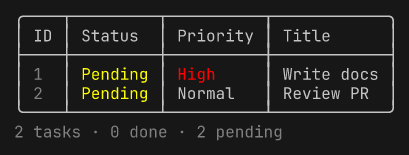
context.AnsiConsole.Output is a Spectre console for standard output. IDs are grey, statuses and priorities use their own colours, and the summary line sits below the table. Markup.Escape keeps task titles from being interpreted as Spectre markup.
Update the add output
AddCommand still writes plain text. Update its success message so it follows the same pattern:
public sealed class AddCommand : IAsyncCommand<AddParameters>
{
    public async Task<int> ExecuteAsync(
        CommandContext context,
        AddParameters parameters,
        CancellationToken cancellationToken)
    {
        var store = new TodoStore(TodoStore.DataPath);
        var tasks = (await store.LoadAsync(cancellationToken)).ToList();
        var id = tasks.Count == 0 ? 1 : tasks.Max(task => task.Id) + 1;

        tasks.Add(new TodoItem(id, parameters.Title, parameters.Priority));
        await store.SaveAsync(tasks, cancellationToken);

        context.AnsiConsole.Output.MarkupLineInterpolated(
            $"[green]Added task [bold]{id}[/]: {Markup.Escape(parameters.Title)} ({parameters.Priority.ToString().ToLowerInvariant()})[/]");
        return 0;
    }
}
Successful changes are fully green, task IDs are bold, and only secondary hints use grey.
Use Spectre help and errors
Configure the default Spectre help provider and the Spectre error writer together:
var app = ConsoleAppBuilder.Create()
    .WithName("todo")
    .ConfigureHelp(help => help
        .UseSpectreHelp())
    .ConfigureErrorHandling(errors => errors
        .UseSpectreErrors())
    .ConfigureCommands(commands => commands
        .AddAsyncCommand<ListCommand>("list", "List all tasks")
        .AddAsyncCommand<AddCommand, AddParameters>("add", "Add a task"))
    .Build();
AnyCLI's own command-line errors, such as an unknown option, are now written through the Spectre error writer.
Run the app
Add a couple of tasks if you have not already done so:
dotnet run -- add "Write docs" --priority high
dotnet run -- add "Review PR" --priority normal
List the tasks:
dotnet run -- list
Command-line errors are styled too:
dotnet run -- add "Write docs" --unknown
