Command Groups
A flat command list works while todo is small. As commands accumulate, related operations are easier to discover when they live under a shared group. In this step, you'll add a data group with two commands: one that shows where tasks are stored and one that clears the task list.
The existing list, add, and done commands stay at the root. A command group is a container for subcommands; it does not execute on its own.
Add the parameter types
Every command in a group still receives the application's global options and returns its typed exit code. Add parameter types that inherit TodoGlobalOptions:
public sealed partial record DataPathParameters : TodoGlobalOptions;

public sealed partial record DataResetParameters : TodoGlobalOptions;
Add the commands
Add the two commands to the project:
public sealed class DataPathCommand
    : IAsyncCommand<DataPathParameters, TodoExitCode>
{
    public Task<TodoExitCode> ExecuteAsync(
        CommandContext context,
        DataPathParameters parameters,
        CancellationToken cancellationToken)
    {
        context.Console.Output.WriteLine(JsonTodoStore.DataPath);
        return Task.FromResult(TodoExitCode.Success);
    }
}

public sealed class DataResetCommand(ITodoStore store)
    : IAsyncCommand<DataResetParameters, TodoExitCode>
{
    public async Task<TodoExitCode> ExecuteAsync(
        CommandContext context,
        DataResetParameters parameters,
        CancellationToken cancellationToken)
    {
        var tasks = await store.LoadAsync(cancellationToken);
        await store.SaveAsync([], cancellationToken);

        if (tasks.Count == 0)
        {
            context.AnsiConsole.Output.MarkupLine("[yellow]No tasks to clear.[/]");
            return TodoExitCode.Success;
        }

        var noun = tasks.Count == 1 ? "task" : "tasks";
        context.AnsiConsole.Output.MarkupLineInterpolated(
            $"[green]Cleared [bold]{tasks.Count}[/] {noun}.[/]");
        return TodoExitCode.Success;
    }
}
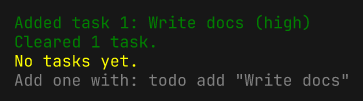
DataResetCommand injects ITodoStore, loads the current tasks, and replaces the store contents with an empty list. It uses that count to report how many tasks were cleared. DataPathCommand uses plain output because a filesystem path should be printed literally.
Register the commands
Register the new commands with the container:
services.AddTransient<DataPathCommand>();
services.AddTransient<DataResetCommand>();
Add the group
Add the data group inside ConfigureCommands:
var app = ConsoleAppBuilder.Create()
    .UseServiceProvider(provider)
    .WithName("todo")
    .AddGlobalOptions<TodoGlobalOptions>()
    .ConfigureHelp(help => help
        .UseSpectreHelp())
    .ConfigureErrorHandling(errors => errors
        .UseSpectreErrors()
        .UseExitCode(TodoExitCode.CommandLineError))
    .ConfigureCommands<TodoExitCode>(commands => commands
        .AddAsyncCommand<ListCommand, ListParameters>("list", "List all tasks")
        .AddAsyncCommand<AddCommand, AddParameters>("add", "Add a task")
        .AddAsyncCommand<DoneCommand, DoneParameters>("done", "Mark a task as done")
        .AddGroup("data", "Manage task data", data => data
            .AddAsyncCommand<DataPathCommand, DataPathParameters>(
                "path", "Show the task data path")
            .AddAsyncCommand<DataResetCommand, DataResetParameters>(
                "reset", "Clear all tasks")))
    .AddInterceptor<LogLevelInterceptor>()
    .AddInterceptor<LoggingInterceptor>()
    .Build();
AddGroup creates the data node, and the callback registers its child commands. Groups can contain other groups by calling AddGroup again inside the callback.
Run the app
Inspect the group's help:
dotnet run -- data --help
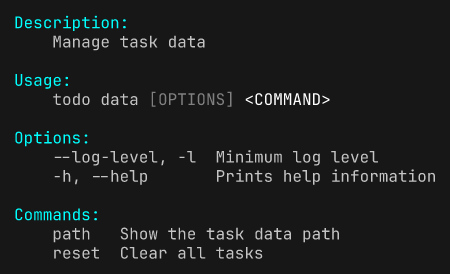
Running todo data without a subcommand reports that a subcommand is required and returns exit code 2.
Show the data path:
dotnet run -- data path
The exact path depends on your operating system, but it always points at the per-user application data directory.

Clear the task list:
dotnet run -- add "Write docs" --priority high
dotnet run -- data reset
dotnet run -- list